First impressions matter – especially when customers call. In Zendesk’s 2026 CX Trends survey, 86% of consumers said a company’s responsiveness highly influences their purchase decisions.1
An auto attendant is often the first interaction a caller has with your company, and it sets the tone for the entire experience. When it’s done right, it can make your business feel more professional, organized, and accessible. But when it’s done wrong, it frustrates callers and sends them straight to your competitors.
Despite being one of the most fundamental features of modern phone systems, auto attendants are still underutilized. Here's what you need to know about this technology and how it can help your business grow.
TL;DR
- An auto attendant is an automated phone system feature that greets callers with a menu and routes them to the right person, department, or extension without a live operator.
- Compared with a live receptionist, an auto attendant works 24/7, handles unlimited simultaneous calls at a fraction of the cost, and scales from one call to a thousand.
- Menu design is critical: keep menus to three levels at most and always offer a live-person option, since 33% of callers abandon calls over navigation issues.
What Is an Auto Attendant?
An auto attendant is an automated feature on phone systems that greets callers and directs them to the correct resource. It’s a popular technology, with nearly 86% of Fortune 500 companies already using auto attendants.2 But as more providers add auto attendant capabilities to their phone systems, businesses of all sizes can now embrace it.
Auto attendants provide a pre-recorded message when someone calls your business – often something like "Thank you for calling. Press 1 for Sales, Press 2 for Support, Press 3 for Billing" – and let the caller select the option that matches their needs.
The system then routes the call to the right destination based on the caller's input, whether that’s an individual’s extension, a department queue, or an external number. The entire process is automated, fast, and scalable – enabling business phone systems to handle one call or a thousand with the same efficiency.
What Is an Auto Attendant in a Phone System?
In traditional PBX systems, an auto attendant was a hardware-based feature requiring specialized equipment and professional configuration.
In modern cloud-based phone systems like UniVoIP’s OfficeConnect™ platform, an auto attendant is a software feature that can be configured and updated through an intuitive web interface – no hardware or IT expertise required.
In many modern phone systems, the auto attendant integrates with other features like call routing, voicemail, call queues, and business hours settings. For example, you can configure your auto attendant to route calls to live agents during business hours and direct callers to leave a voicemail when the office closes.
What Is Auto Attendant Phone System Functionality?
When businesses ask "what is auto attendant phone system functionality," they're really asking what the feature can do. The answer depends on the sophistication of your phone system, but modern auto attendants offer capabilities that go far beyond basic call routing.
Customizable Greetings
Auto attendants let you record professional greetings that reflect your brand voice. You can also assign different greetings based on time of day, day of the week, or special circumstances like holidays.
Menu Options and Call Routing
The auto attendant directs your callers to specific extensions, departments, or external numbers, and you can make the caller menus as simple or complex as your business requires. UniVoIP’s Contact Center and OfficeConnect™ UCaaS solutions include robust auto attendant capabilities designed to streamline call routing.
Business Hours Management
Auto attendants let you automatically adjust call handling based on when your business is open or closed. It can send after-hours callers to voicemail, give them emergency contact information, or even direct them to self-service resources.

Caller ID and CRM Integration
Advanced auto attendant systems can recognize incoming caller IDs and route VIP customers or repeat callers differently than new contacts. Plus, integrating the system with your CRM allows for even more personalized routing based on customer history.
Voicemail and Message Delivery
If the intended recipient is unavailable, the auto attendant can seamlessly transfer the caller to voicemail and deliver messages via email or SMS for faster follow-up.
What Is Phone Auto Attendant Compared to a Live Receptionist?
Auto attendants and live receptionists serve different purposes.
A live receptionist provides a personal touch. They can answer questions, offer assistance, and handle complex or nuanced requests that automated systems struggle with. However, they're expensive, limited by business hours, and can only handle one call at a time.
An auto attendant is available 24/7, handles unlimited simultaneous calls, never takes breaks, and operates at a fraction of the cost. For straightforward call routing – getting sales calls to the sales team, support calls to support – an auto attendant is faster and more reliable.
Most businesses take a hybrid approach. They use an auto attendant for initial routing and high-volume scenarios, and live agents for more complex or high-value interactions. At UniVoIP, we designed our Contact Center solutions to support exactly this kind of intelligent routing strategy.
Auto Attendant vs IVR: Understanding the Difference
One of the most common sources of confusion is the difference between an auto attendant vs IVR. But while these technologies are related, they serve distinct functions. Here’s a quick breakdown:
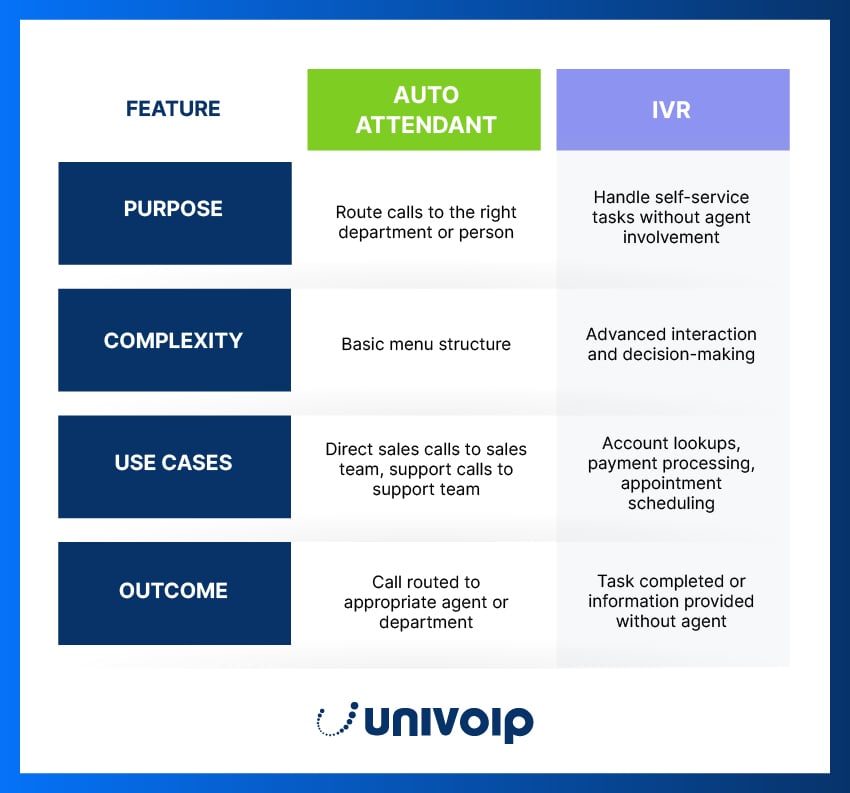
- Auto attendants route calls based on simple menu selections, such as "Press 1 for Sales.” The system then directs the call to a person or department.
- IVR systems interact with callers to complete tasks or provide information without human involvement. The system processes caller input and performs actions – checking balances, scheduling appointments, processing payments – without transferring to an agent.
Many modern phone systems, including UniVoIP’s, combine both capabilities. An auto attendant handles the initial routing, and IVR handles self-service transactions.
5 Must-Have Auto Attendant Features for Business
Ready to get started with an auto attendant system for your business? When evaluating solutions, watch for these essential features:
1. Easy Configuration and Updates
You should be able to update greetings, menu options, and routing rules without calling IT support or your phone provider. Cloud-based systems make this easy through intuitive, web-based admin portals.
2. Professional Voice Recording Options
The quality of your phone system greetings matters. Look for an auto attendant that supports professional voice recordings or offers text-to-speech options with natural-sounding voices.
3. Seamless Integration
Your auto attendant should integrate with your broader communications ecosystem – including your CRM systems, help desk software, and scheduling tools – so that you can create a unified customer experience.
4. Intelligent Call Routing
Beyond basic menu selections, advanced routing can take factors like caller ID, agent availability, and call volume into account in order to direct calls more effectively.
5. Analytics and Reporting
Track which menu options callers chose most often, how long callers spend in menus, and where they abandon calls. This data can help you optimize your call flows over time.
What is Multi-Level Auto Attendant?
A multi-level auto attendant – also called a nested or tiered auto attendant – allows callers to navigate through multiple menus to reach the right destination. For example:
- Main menu: "Press 1 for Sales, Press 2 for Support, Press 3 for Billing"
- If the caller presses 2 (Support): "Press 1 for Technical Support, Press 2 for Account Questions, Press 3 to speak with a representative"
- If the caller presses 1 (Technical Support): Routed to the technical support queue
Multi-level auto attendants prevent menu overload, which happens when a single menu tries to accommodate too many options, and give callers more precise control over where their call is directed.
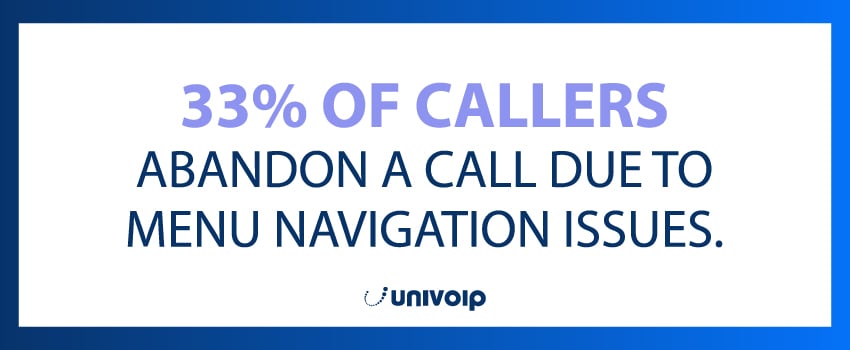
Don’t over-complicate the menu structure, however. Long, complex phone menus frustrate callers, with 33% abandoning calls due to navigation issues.3 The best practice is to limit menus to three levels maximum and always offer an option to speak with a live person.
Make Every Call Count With UniVoIP
Your auto attendant is the first voice callers hear, and that moment matters. A well-designed system removes friction from the customer's opening interaction, but a poorly designed one frustrates callers before they reach anyone who can help.
At UniVoIP, our Contact Center and OfficeConnect™ platforms include enterprise-grade auto attendant features that are easy to configure, flexible enough to grow with your business, and sophisticated enough to handle complex routing scenarios. Whether you need a simple menu to route calls between departments or a multi-level auto attendant system that handles hundreds of daily interactions, we have the tools and expertise to help you get it right.
Ready to upgrade your phone system with a powerful auto attendant? Get started with UniVoIP today.
Auto-Attendant FAQs
What is an auto attendant?
An auto attendant is an automated phone system feature that greets callers and routes them to the right destination without a live operator. When someone calls, they hear a pre-recorded menu, something like "Press 1 for Sales, Press 2 for Support," and select the option that fits their need. The system then directs the call to the matching extension, department queue, or external number based on that input. The process is fast, automated, and scalable, so your phone system can handle one call or a thousand with the same efficiency.
What is the difference between an auto attendant and IVR?
An auto attendant routes calls based on simple menu selections, like "Press 1 for Sales," sending the caller to a person or department. An IVR (interactive voice response) system goes further, letting callers complete tasks or get information without a human, such as checking a balance, scheduling an appointment, or making a payment. The short version: an auto attendant directs calls, while IVR handles self-service transactions. Many modern phone systems combine both, using the auto attendant for initial routing and IVR for self-service.
What is the difference between an auto attendant and a live receptionist?
A live receptionist offers a personal touch and can handle complex or nuanced requests, but is limited to business hours, handles one call at a time, and costs more. An auto attendant is available 24/7, manages unlimited simultaneous calls, never takes breaks, and runs at a fraction of the cost. For straightforward routing, getting sales calls to sales and support calls to support, it is faster and more reliable. Most businesses use both: the auto attendant for initial routing and high-volume periods, live agents for complex or high-value conversations.
What is a multi-level auto attendant?
A multi-level auto attendant, also called a nested or tiered auto attendant, lets callers move through more than one menu to reach the right destination. A main menu might offer Sales, Support, and Billing; choosing Support then opens a submenu for Technical Support, Account Questions, or a representative. This prevents menu overload, where a single menu tries to cram in too many options, and gives callers more precise control. Keep it manageable though: limit menus to three levels at most, and always offer a way to reach a live person.
Can an auto attendant route calls after hours?
Yes. Auto attendants let you automatically adjust call handling based on whether your business is open or closed. After hours, the system can send callers to voicemail, share emergency contact information, or point them to self-service resources. Many setups route calls to live agents during business hours and switch to voicemail once the office closes. You can also tailor greetings by time of day, day of the week, or special dates like holidays, so callers always get a relevant response.
Is an auto attendant hard to set up?
Not with a modern cloud-based phone system. In older PBX systems, an auto attendant was hardware-based and needed specialized equipment and professional configuration. Today it is a software feature you set up and update through an intuitive web interface, with no hardware or IT expertise required. Your company's administrators can record greetings, adjust menu options, and change routing rules on their own through a web-based admin portal, so the system keeps pace with your business as departments, hours, and priorities change.
Sources:
- https://www.prnewswire.com/news-releases/contextual-intelligence-becomes-the-new-standard-for-exceptional-customer-experience-in-2026-302617972.html
- https://www.unitelvoice.com/blog/fortune-500-phone-system-stats
- https://www.marketgrowthreports.com/market-reports/interactive-voice-response-ivr-software-market-118680